
Tap Alarm Clock2.0.3 - App Store
You'll be able to see results in few seconds.
Publisher Description
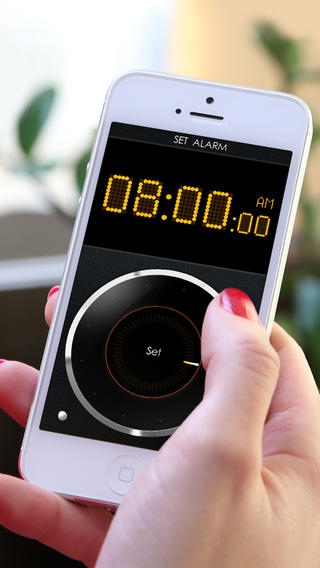
"Tap Alarm Clock deserves a spot on any clock app on iOS device for its cool design, multi-function, and easy using method." - Best10Apps.com
Tired of fiddling with complicated settings trying to set an alarm clock? We have a simple solution for you - Tap Alarm Clock.
Tap Alarm Clock offers a completely new, elegant, but at the same time, simple gesture driven interface! Stylish design solution simplifies setting an alarm down to just a couple of taps and swipes! Stylish design is complemented by the best in class feature set.
Features:
- 10 Built in unique and diverse alarm sounds. Guaranteed to wake you up.
- Set you own tunes form iPod library as an Alarm Sound
- Adjust Alarm Volume.
- Gorgeous Retina Graphics for iPhone 4/4S and new iPad.
- Alarm mode badge on the application icon on the main screen of your iPhone / iPad!!! You can always see alarm status without opening the app
- Super stylish touch wheel fully gesture driven interface
- Big snooze button for those times when it's hard to aim. Countdown dial visualization. Customizable snooze time (1-60 min)
- Unique snooze interface lets you see how long it will take for alarm to sound again and lets you deactivate alarm during the snooze
- Energy-saving display mode (Automatically dimming the light in 5 minutes)
- Customizable brightness! Swipe screen up and down to set the brightness level
- Stylish LCD Display with 16 million colors to choose from! Choose any you like!
- Vertical and horizontal mode/ Portrait or landscape orientation
- 12 - and 24-hour format
Setting Alarm Clock:
- Tap Alarm Clock features unique gesture driven Touchwheel interface for setting alarm time.
- Use Touch and Hold gesture on touchwheel are corresponding to desired time as it would on an analog clock face to quickly set alarm time to exact hour.
- Flick touchwheel to turn it into desired direction to set time.
- Confirm alarm time by tapping set in the middle of touchwheel.
- To snooze Tap in the middle of touchwheel.
- To deactivate Alarm turn touchwheel till the Alarm stops.
NOTE:
- Background alarms are supported if you are running iOS 4.0 or later but their length is limited to 30 sec.
- In order for background alarms work on iOS 5 Tap Alarm Clock must be enabled in Notification Center Settings: Settings > Notifications> Tap Alarm -> On.
- If device is in silent mode background alarm will not sound. Only notification will appear on the screen.
- For the best alarm performance we recommend leaving Tap Alarm Clock open in foreground and plugged in into charger.
Requires iOS 7.0 or later. Compatible with iPhone, iPad, and iPod touch.
About Tap Alarm Clock
The company that develops Tap Alarm Clock is AppAnnex, LLC. The latest version released by its developer is 2.0.3.
To install Tap Alarm Clock on your iOS device, just click the green Continue To App button above to start the installation process. The app is listed on our website since 2012-02-06 and was downloaded 0 times. We have already checked if the download link is safe, however for your own protection we recommend that you scan the downloaded app with your antivirus. Your antivirus may detect the Tap Alarm Clock as malware if the download link is broken.
How to install Tap Alarm Clock on your iOS device:
- Click on the Continue To App button on our website. This will redirect you to the App Store.
- Once the Tap Alarm Clock is shown in the iTunes listing of your iOS device, you can start its download and installation. Tap on the GET button to the right of the app to start downloading it.
- If you are not logged-in the iOS appstore app, you'll be prompted for your your Apple ID and/or password.
- After Tap Alarm Clock is downloaded, you'll see an INSTALL button to the right. Tap on it to start the actual installation of the iOS app.
- Once installation is finished you can tap on the OPEN button to start it. Its icon will also be added to your device home screen.
Program Details
System requirements
Download information
Pricing
Version History
version 2.0.3
posted on 2012-02-06
Disclaimer
Official App Store Link
We do not host Tap Alarm Clock on our servers. We did not scan it for viruses, adware, spyware or other type of malware. This app is hosted by Apple and passed their terms and conditions to be listed there. We recommend caution when installing it.
The App Store link for Tap Alarm Clock is provided to you by apps112.com without any warranties, representations or guarantees of any kind, so access it at your own risk.
If you have questions regarding this particular app contact the publisher directly. For questions about the functionalities of apps112.com contact us.
